Icon of program: Artweaver

Artweaver for Windows

  • Free
  • 3.2
    544
  • 194.5K
  • V8.1.5.3980
Free Download for Windows

View an ad to download for free

Create impressive drawings with this free painting tool

We're used to see image editors, but drawing tools are not so thick on the ground. And a drawing apps like the excellent Artweaver are even rarer!

Unlock your creativity with Adobe Stock

Get 10 images or 1 video with a free trial

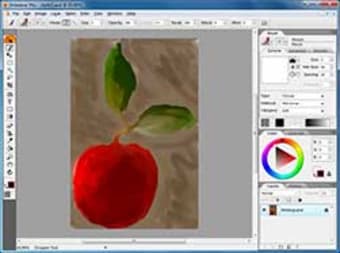
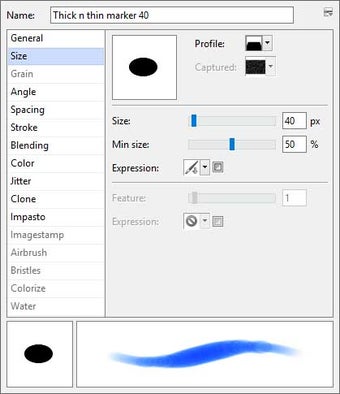
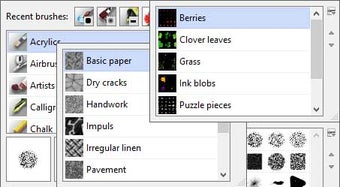
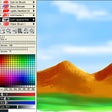
Artweaver is the perfect tool to give free rein to your imagination and creativity. It includes more than a dozen different brushes – each of them with their own tweaks and settings - to create all sorts of effects. The brushes try to convey the feeling and result of using actual drawing tools, and I have to say they do a pretty good job!

Some of the brushes included in Artweaver are acrylics, chalk, charcoal, felt pens, pastels, oils and pencils, among others. There are also a few special filters and adjustments you can use when editing images, but the program's main focus is on drawing.

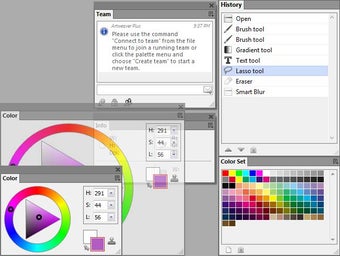
Artweaver stands out for some other interesting features, like support for layers and transparency, a history windows like the one in Photoshop and a comfortable, customizable interface.

Artweaver is a powerful drawing tool with an great selection of brushes to create impressive works of art.

Error that no documents can be opened under seldom circumstances fixed Error in preview of remove red eyes filter fixed Displaying of shortcuts in keyboard shortcuts dialog improved Displaying of change log in online update improved
 0/5

App specs

Program available in other languages


Icon of program: Artweaver

Artweaver for PC

  • Free
  • 3.2
    544
  • 194.5K
  • V8.1.5.3980
Free Download for PC

View an ad to download for free


User reviews about Artweaver

3.2

6 reviews

Add review

Main reviews for you

  • Anonymous user

    This application is kind of a mixed bag. There are a lot of tools in things like Photoshop that are simply not represented here, while others are less user-friendly to use, but for a free application, it is absolutely spot on. You'll never do quality digital drawing with it, it's simply not right for that. But you want to combine/edit existing images, this application will absolutely do the business for you. 99% of my profile content across the internet is made in Artweaver, put it that way. Been using it since it was in beta and it's well worth using if, like me, you can only dream of affording the big corporate apps.

  • Anonymous user

    Worlds most talked up piece of garbage.. This has got to be the worst made art program I've ever seen, drawing in photoshop 10 years ago worked better than this app. If you want to do more than use the pencil don't bother. Pros: Not a single thing Cons: shape, line, layer, customization and movement.

  • Anonymous user

    A nice applicant for intermediate artists. . Clean, quick, and stable. But not really easy to learn. I'v used many applications like this before and this one is a little tricky to find all the do dads. But I like.

  • Anonymous user

    Preety good. I enjoy the fact that it is the same compared to photoshop... Extreamly happy that I downloaded it :) everyone that I have recomended it to loves it :D

  • Anonymous user

    Artweaver is great. well i just installed it yesterday but its awesome kinda of hard to figure out

  • Anonymous user

    Your Freed' Art. The layout and functions have a lot of similarities with other paint programs and it is for free - that in itself makes it worth the 'effort' to download and use. In addition it has an incredible selection and tweak ability of paintbrushes and textures that would excite anyone with a desire to really use this extensive function. Pros: Excellent for painting, manipulating and creating. Cons: Many unsuccessful or incomplete moves will hasten the pop-up warning window to appear which then needs to be acknowledged.

More

You may also like

Alternatives to Artweaver

Explore Apps

Related Articles

Latest articles

Laws concerning the use of this software vary from country to country. We do not encourage or condone the use of this program if it is in violation of these laws.
Softonic

Is Artweaver safe?

100/100

Score result: Clean

This file passed a comprehensive security scan using VirusTotal technology. It is safe to download.

  • Virus free
  • Spyware free
  • Malware free
  • Verified by Security Partners

    VirusTotal logo

Scan Info

Last scan
Monday, June 22, 2026
Scan provider
VirusTotal · Full report

File Integrity

File
8.1.5.3980.exe
SHA256
5c05fc1827372a6fd12d44fa72a7e92e5d27ba118db30f9d9f5c4ff2fe49a702
SHA1
9bc6359eaea2361bf1e4f37176dd1465c9aa1edf

Softonic security commitment

Artweaver has been thoroughly scanned by our advanced security systems and verified by industry-leading partners. This file comes from the official developer and has passed all our security checks, showing no signs of viruses, malware, or spyware. For more information, visit our Security and Trust Center

Signed in to Softonic as